 Hushtype
Polished by Claude
Ums and ahs disappear, punctuation shows up, and “five, no, six” becomes “6”. Short clean phrases skip Claude entirely.
Hold a key and talk. Let go, and Hushtype types clean, punctuated text into whatever app you were already in. No fillers, no fixing, no window to switch to.
brew install --cask chiranjeebhub/tap/hushtypeAre we still on for the demo tomorrow?
5 works for me, but I might run late 🙏
Click any window or Dock icon to switch apps. Hold ⌥ on your keyboard or the button, then let go. Pressing another key while holding cancels, just like the app.
Built in Swift and SwiftUI, so it feels like part of macOS. It lives in the menu bar and stays out of your way until you hold the key.
Ums and ahs disappear, punctuation shows up, and “five, no, six” becomes “6”. Short clean phrases skip Claude entirely.
Casual in Slack, careful in Mail, literal in your editor. It continues your sentence and spells names that are already on screen.
Select text, hold ⌃⌥ and say “make this shorter” or “translate to Hindi”. With nothing selected, it writes what you ask for.
A personal dictionary for names and jargon. Fix a spelling right after dictating and Hushtype remembers it next time.
Say “my calendar link” and the full text is typed. Every dictation is searchable on your Mac, and ⌃⌘V pastes the last one again.
Your dictionary, snippets and preferences follow you to your other Macs. Signed releases keep themselves up to date.
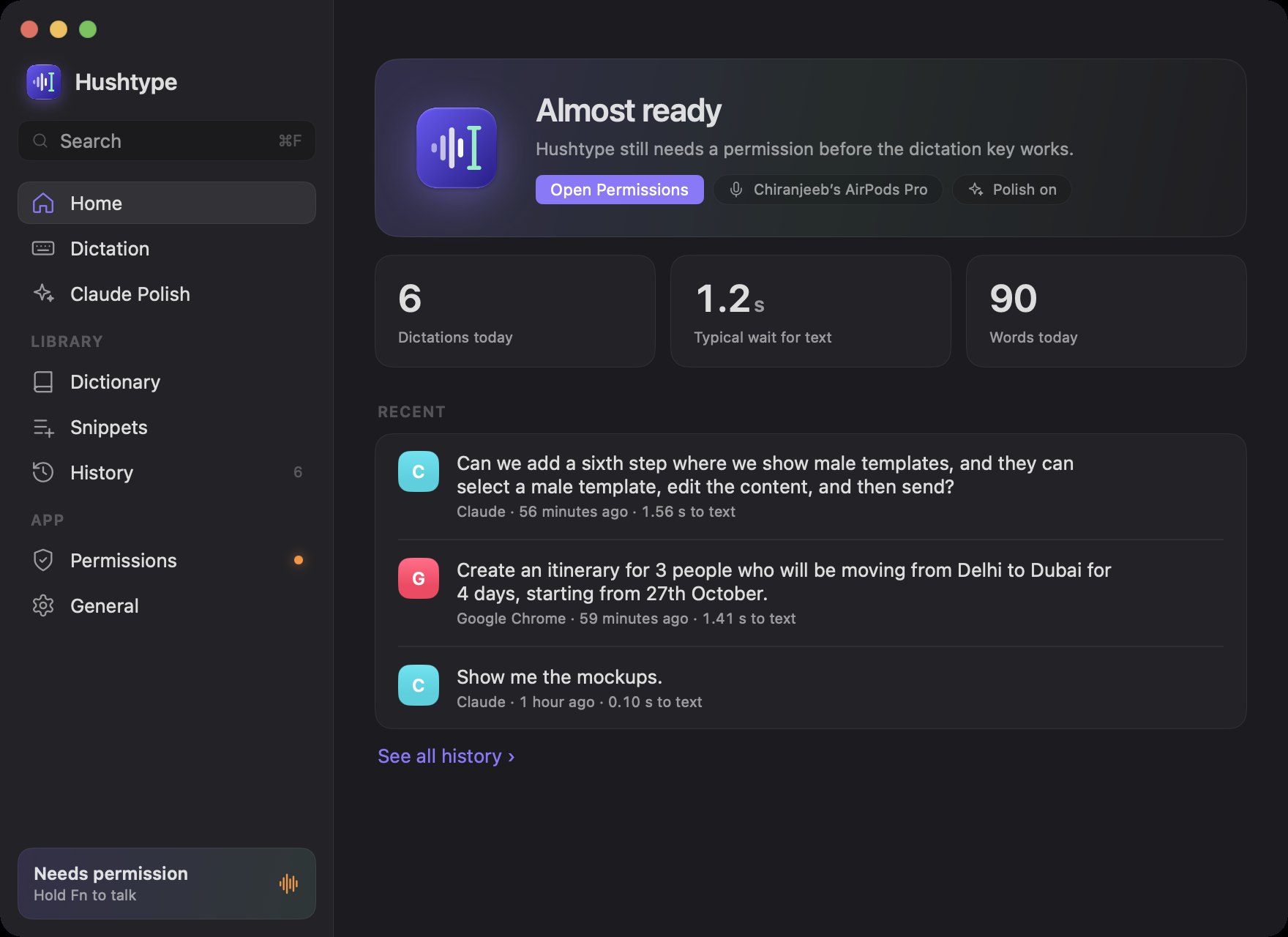
Settings opens on Home: today's dictations, typical wait for text, and your recent history.
A short guided setup does the fiddly parts for you, and each step ticks itself off as soon as it’s done.
Speech recognition runs on-device with Apple’s SpeechAnalyzer. Only the transcript goes to Claude for polish, with your own key, and you can turn that off.
One line in Terminal.
brew install --cask chiranjeebhub/tap/hushtypeClone the repo and run scripts/build-app.sh with Xcode 26.
Requires macOS 26 Tahoe or later and an Anthropic API key for polish. On first launch Hushtype asks for Microphone and Accessibility access, which macOS requires before an app can hear you and type for you.
Hushtype is MIT-licensed and built in the open. If it saves you some typing, a star helps other people find it, and a sponsorship or a coffee keeps new features coming.
Yes. The app is free and MIT licensed. Polish uses your own Anthropic API key, and Claude Haiku costs a fraction of a cent per dictation. Short phrases with nothing to fix skip Claude entirely.
macOS only lets an app notice a held key system-wide and type into other apps once you allow Accessibility. Hushtype also reads the text around your cursor for context, and never from password fields.
Speech recognition does, once the voice model for your language has downloaded. Without a connection, or if Claude is slow to answer, you get the raw transcript within two seconds.
Yes. Right Option is the default, and you can switch to Right Command or Fn/🌐 in Settings. Pressing any other key while holding it cancels, so your shortcuts keep working.
Hushtype is a native Swift app, transcribes on your Mac instead of uploading your audio, is open source, and has no subscription.